 By Ultima Music
Real time or note by note
Use Real time to capture a phrase with its timing. Use Note by note to play at your own pace and give each detected note the length you select.
A guitar idea deserves room to grow
Play a riff into Live Capture, then shape the tab, add harmonies and build a rhythm part in the same guitar workspace.
One purchase. No subscription. The full editions add longer projects, more harmonies and .ghh project saving.
Use Live Capture to get a clean single-note line into your project, then adjust the notes or timing in the editor.
Use Real time to capture a phrase with its timing. Use Note by note to play at your own pace and give each detected note the length you select.
Choose a starting string and fret or use Automatic. Review the suggested tablature before you insert it into Main Guitar.
Open Chord Analysis to record or open a WAV, review the suggested chord shapes, and export the recorded take if you want to keep it.
Select the input and channel in the editor. The full web edition uses browser audio. The Windows app supports ASIO and Windows audio.
Capture the riff while it is fresh
Click a string and type its fret number. Hear notes as you enter them, move with WASD, and press Space to play or stop. Left and Right Arrow shift columns after the cursor. Use up to 0.9 seconds between the two digits of a fret number.
Keep the main guitar, harmony parts and compact rhythm-guitar lane together. The toolbar and fretboard stay in place while the score scrolls.
Choose Standard, Drop D, DADGAD, Open G, half-step down or whole-step down tuning, or enter custom open-string pitches. Set a capo, project name, tempo and time signature.
Drag or Shift-click a phrase, copy and paste it, and use undo/redo. Ordinary barlines are recalculated from the destination timing.
Use note options or right-click to edit a note’s string/fret, move a pitch by semitone or octave, find another location for the same pitch, or explore chord locations. Insert an empty note position before the cursor or remove a position.
Read note timing and stacked pitch-name rows above the parts. Select a phrase by dragging, Shift-clicking or Select All, then copy/paste within the project and undo/redo.
Find a second part that belongs
Choose unison or a diatonic second, third, fourth, fifth, sixth, seventh or octave above or below the lead. Paid editions support up to 16 harmony parts, with individual playback so you can hear each contribution.
Adjacent strings is the first choice and the default. Try Smooth phrase positioning, the same string, open or higher neck regions, or a particular string.
Edit an individual harmony note, use a note outside the scale, remove a note, or reset it to the generated harmony. Custom note choices stay in place across fingering modes.
Shift a selected harmony section up or down an octave, or find another string/fret location for the same pitch.
Give each harmony its own key, scale, interval and fingering. Change these under Locations / settings, reset a selected section to the generated notes, or remove a harmony and try another.
See the musical possibilities
Detect scales from your lead and compare matching-note percentages. A short riff can fit several scales; listen and choose the direction you like.
See major and relative natural minor together, plus harmonic and melodic minor in each key. Fret numbers outside the selected scale turn red.
See the selected scale across the six-string neck, choose a root and scale yourself, and switch between pitch names and fret numbers.
The Add Harmony dialog starts with your chosen fretboard scale, with the option to select another key or scale.
Click a displayed fretboard note to hear it. Switch between note names and fret numbers, clear a selected chord to return to scale notes, or show/hide the fretboard from View.

Give the lead something to play against
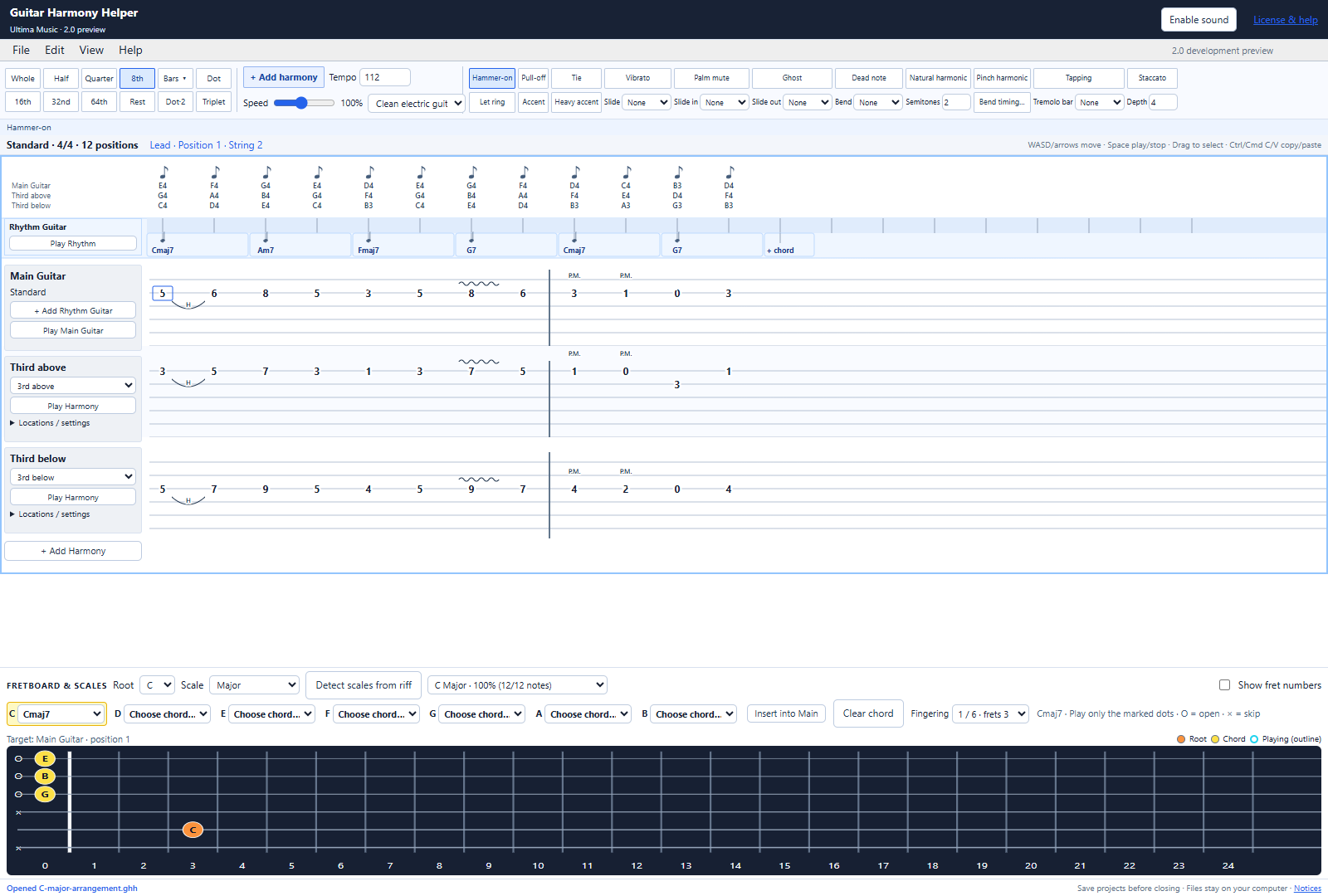
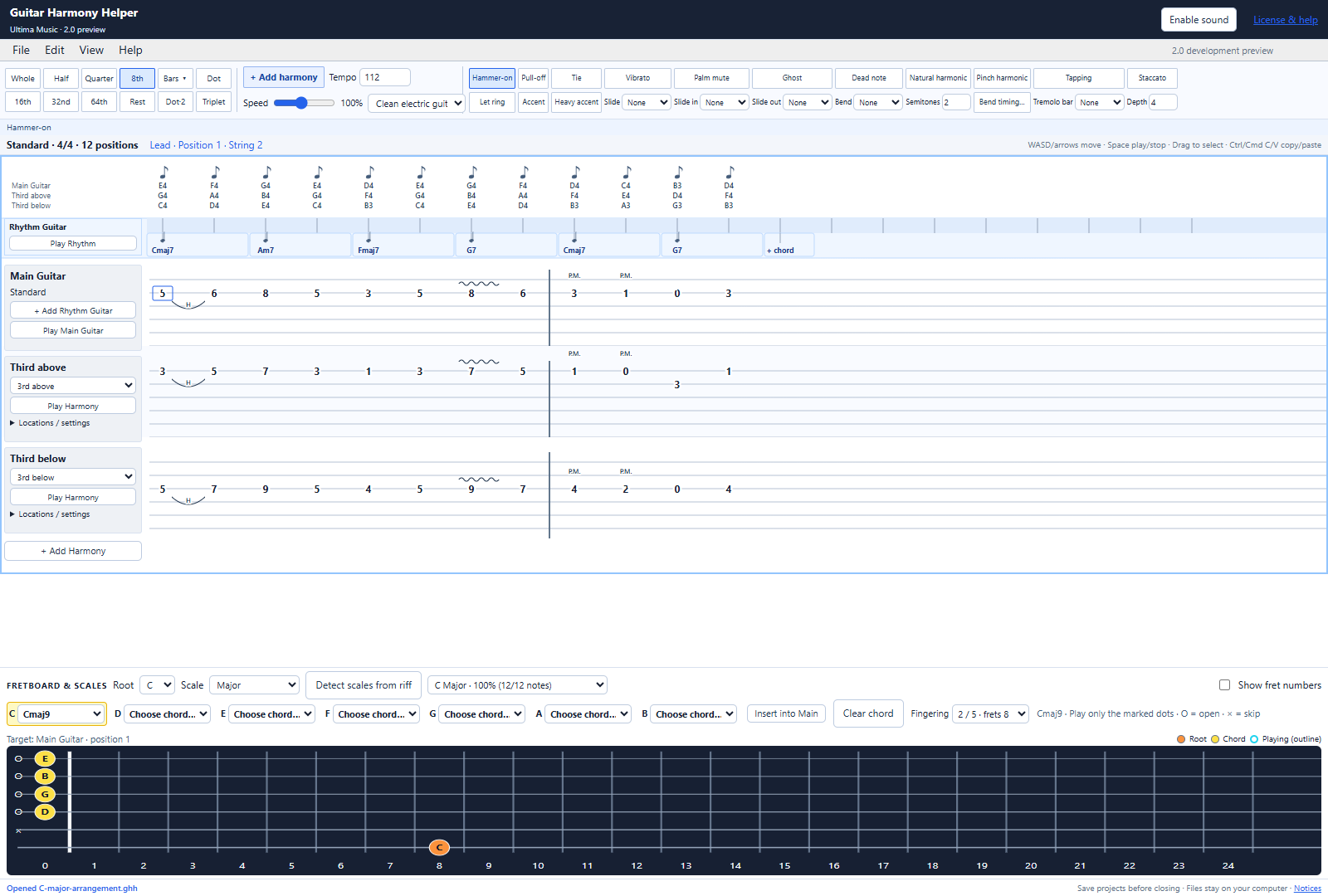
Each note has a dropdown with diatonic triads, 7ths, 9ths, 11ths, 13ths, sixths, add9 and suspended chords. Power chords such as C5 use a root and perfect fifth.
A selected chord highlights its actual string/fret positions. Orange marks the root; yellow marks the other notes. O means open and × means skip.
Use the Fingering dropdown to explore alternate positions. Insert uses the exact shape shown. Seven-tone 13ths omit the fifth to fit six strings, with a visible note.
Add the compact rhythm lane, click its timing grid and insert a chord. Give rhythm chords their own durations, dots or tuplets, then hear the accompaniment alone or with the whole arrangement.
Place a chord later in the lane and the gap becomes rests. Placement preserves later chord start times. Backspace/Delete clears a selected rhythm chord to a rest; changing a chord’s duration moves the following rhythm as expected.
Edit an existing rhythm chord’s timing with the same duration, dot and tuplet tools. Copy/paste rhythm chords, remove a chord from its context menu, or undo the last change. Clicking the main tab switches insertion back to the main guitar.
Put the movement on the beat
Use note lengths, rests, single and double dots, triplets and custom tuplets. Add tempo and meter changes in the full editor.
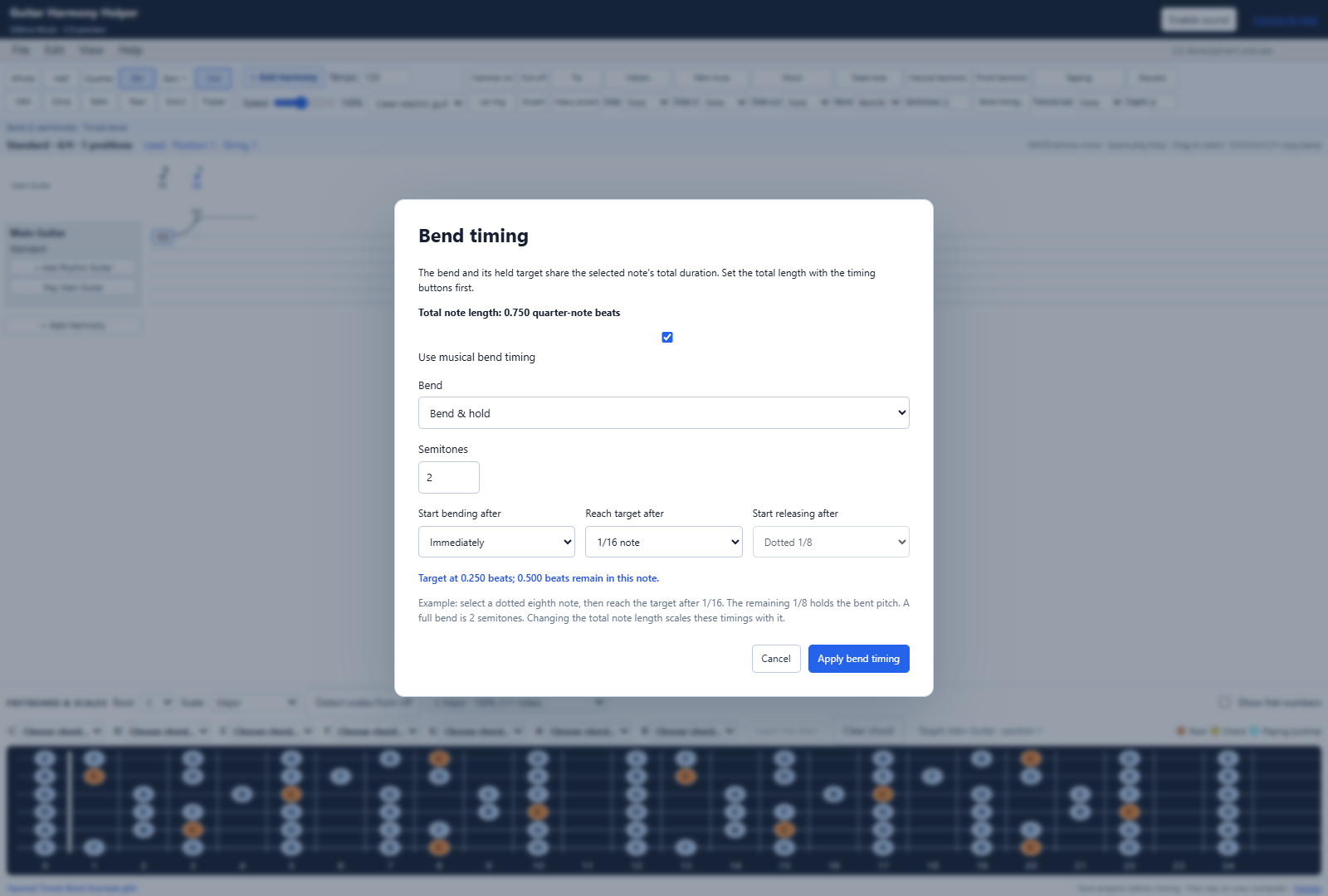
Choose when the bend starts, reaches its target and begins to release. The held target has its own rhythmic head and pitch label, with no extra pick or added duration.
A dotted eighth can contain a sixteenth-note rise and an eighth-note hold. A full bend is two semitones; the timing controls determine when it arrives.
Try straight timing, swung eighths or swung sixteenths. Add repeat starts and ends with a chosen total play count; playback follows the repeat jumps.
Use automatic measure boundaries or an explicit ordinary barline in full projects. Apply tempo and time-signature changes at a selected position, and set repeat starts, repeat ends and their total play count.
Write how the part should feel
Use hammer-ons, pull-offs and ties; distinguish shift and legato slides, and add slides into or out of a note.
Choose bend-and-hold, bend-and-release or prebend-and-release, add vibrato or tremolo-bar effects, and set custom bend and bar curves.
Add palm mute, staccato, let ring, accents and heavy accents, plus ghost notes, dead notes, natural and pinch harmonics, and tapping.
Add picked grace notes before or on the beat, legato trills and tremolo picking. The browser and Windows audio engines have their own sound and articulation character.
Advanced guitar effects has 13-point bend and tremolo-bar curves, with values in semitones and half-semitone steps. Custom curves take precedence over the matching automatic preset.
Hear the arrangement. Keep the idea.
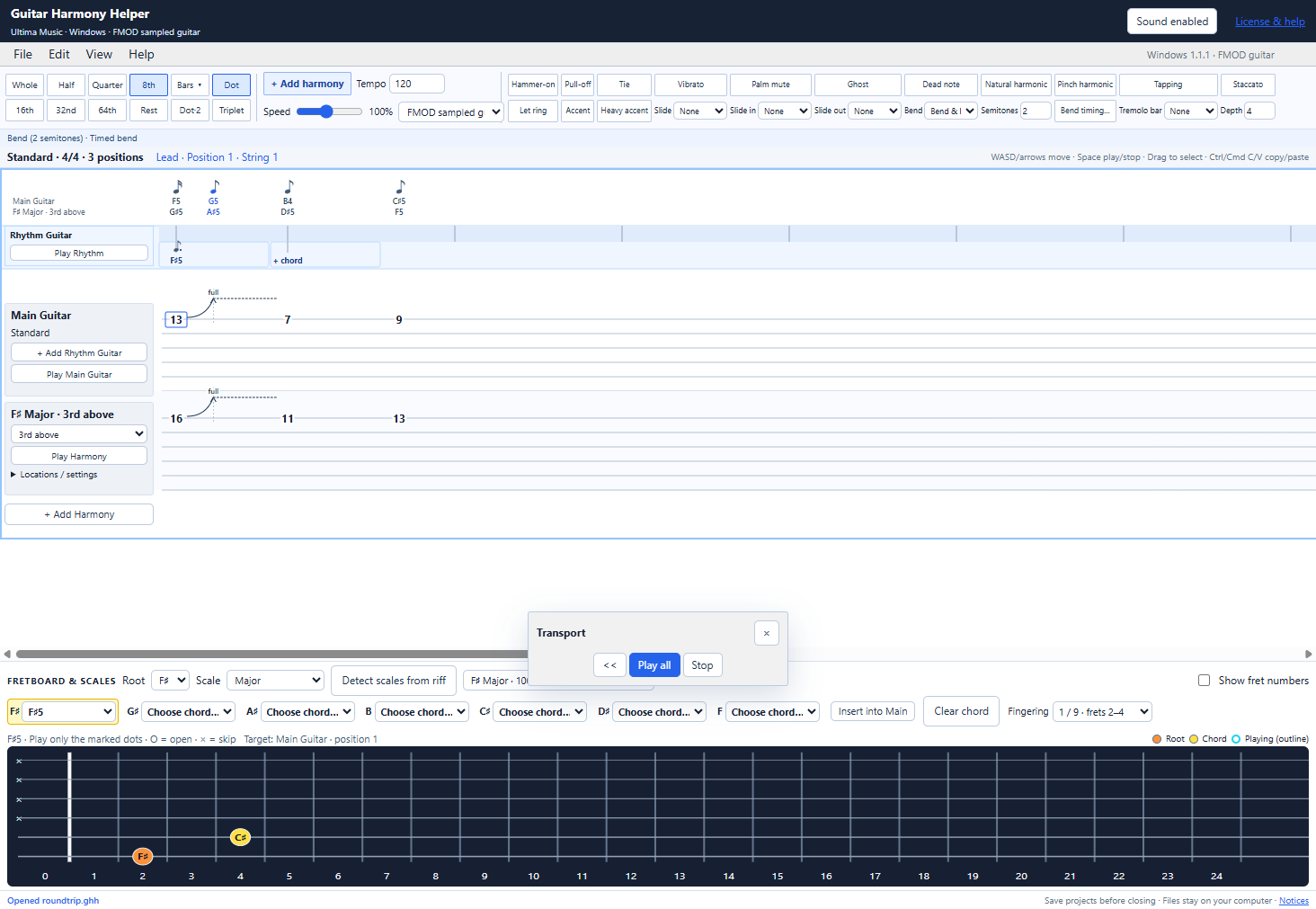
Play all parts, the main guitar, a harmony or rhythm guitar. Follow the playback cursor and see playing positions outlined on the fretboard.
Adjust playback speed to hear the detail, change the tempo, and compare different harmony intervals or fingerings.
Use the paid browser editor with your license file. Browser audio uses SoundFont instruments; save and reopen local .ghh files in the full version.
The Windows app uses the current editor interface with native FMOD sampled-guitar playback. Its installer is digitally signed by Stephen Chrzan.
Save .ghh files to your own computer. Undo/redo and project saving preserve the current editing features, including rhythm guitar, harmony edits and timed bends. Cloud saving is not included.
Choose clean electric, steel-string, nylon-string, jazz, muted, overdriven or distortion guitar, or guitar harmonics in the browser. Windows uses its included FMOD sampled-guitar instrument.
Move the floating transport by dragging its header, rewind to the beginning, and show it again from View. Playback speed ranges from 25% to 200%; the main tempo range is 20–400 BPM.
Start a new project with your tuning and timing settings, or open an existing .ghh project. Download/save your current work and reopen it later; files are kept on your computer.
Import your paid .ghhlicense file to unlock the web editor or activate the Windows app. Existing paid version 1 licenses work with the current editions. One personal license covers one person on up to two computers.
Try the workflow before buying
Explore one 4/4 bar of lead and rhythm guitar plus one generated harmony. Notes, rests and gaps count toward the bar; the trial refuses edits that exceed it.
Start with the guided tips or explore on your own. Move forward or back, close the tip windows, and reopen Feature tips whenever you want.
Use Home to return to the website or Get full version to see the paid offer. The paid editions add longer projects, more harmonies and project opening/saving.
The demo has no time limit, but refreshing or leaving clears the riff. Opening and saving .ghh files are full-version features.
Try the idea. Keep building.
Explore one 4/4 bar, one harmony and rhythm guitar in the free demo, with feature tips and no time limit. When you want longer projects, more harmonies and saving, the same purchase gives you the paid web editor for Mac and Windows plus the Windows app.
One person, up to two computers. Permanent version 1 use with free version 1 updates. Future major versions may be sold separately. Projects save locally; cloud saving is not included.
Early-access price: $7.50 USD once through December 31, 2026 at 11:59 p.m. Pacific Time. From January 1, 2027, the regular price is $25 USD once. One purchase includes web access and the Windows app. Review the final price at checkout.